
Codes to try
Checked against published reports on . Codes can expire between patches.
Patch 2
PATCH2!20 Spins
Patch 2
20KLIKES10 Spins
Patch 1
PATCH1!30 Spins
Earlier
UPDATECOMING20 Spins
Launch
THANKYOU!10 Spins
Use shop
RELEASE!10 Spins + Reset Orb
How to redeem
- Join the Beyond Nen Roblox group
Use the same account you play on. Open the Beyond Nen group and join. If the Codes tab still asks for it, like the experience and rejoin the server.
- Open the in-game shop
On keyboard, press M and open Products, then Codes. On other devices, open the in-game menu and look for Shop or Products.
- Paste one code and select Redeem
Keep the uppercase letters and the final exclamation point where shown. Check the reward confirmation and your spin balance or inventory.
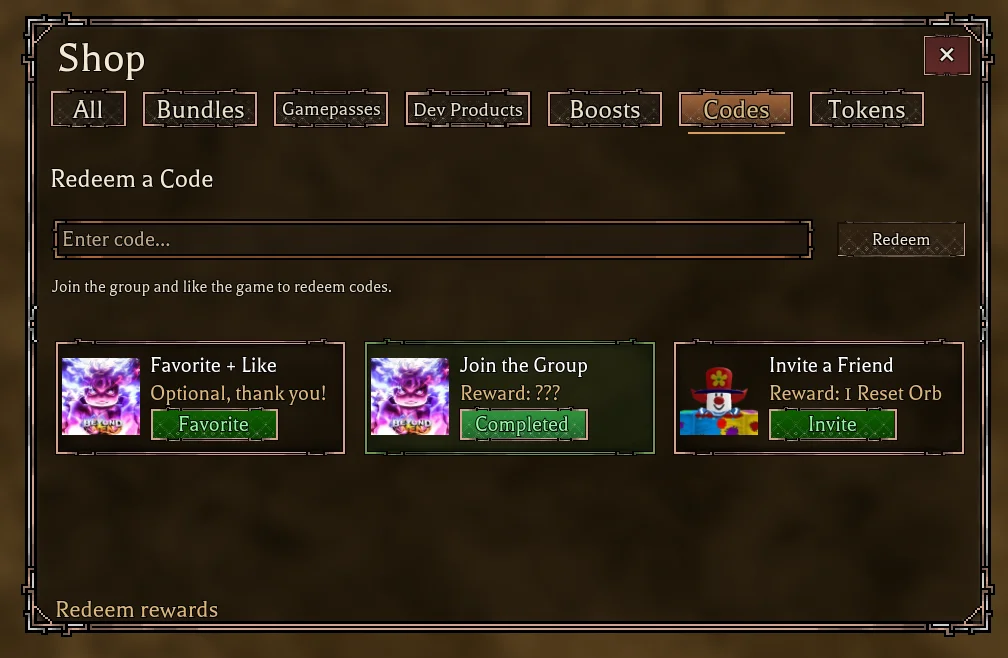
If a code fails
- Invalid or expired
- Check for extra spaces and missing punctuation. If the exact code still fails, try a newer one or check the current announcements.
- Already redeemed
- The code has already been claimed on this account. Check the spin balance or inventory instead of resubmitting.
- Spins only in Customize
- Some spin codes can be entered there. If you are claiming RELEASE! or the reward includes an item, use Shop → Codes after loading into the game.